Showing posts with label WLAN Troubleshooting with Wireshark. Show all posts

Monday, October 14, 2019

WLAN Analysis with Wireshark (Frame Section, Part 5)

In each of previously saved Wireshark capture files, identical number of frames and time-span are included. In the column of "No." that should describe total frames being collected, where 106,879 is the case in the following example.


In the second column, that shows the exact time where these frame are collected, July, 18, 2019 was the date of this exercise.

Under the menu of "View > Time Display Format" we can select "Seconds Since Beginning of Capture," it should be 46 (seconds). That means we spent around 46 seconds to collect the packets.


When you take Capture File Properties under the menu of Statistics, the given result should match the statement displayed above.


Under the menu of "View > Time Display Format" we can select "Seconds Since Beginning of Capture," it should be 46 (seconds). That means we spent around 46 seconds to collect the packets.

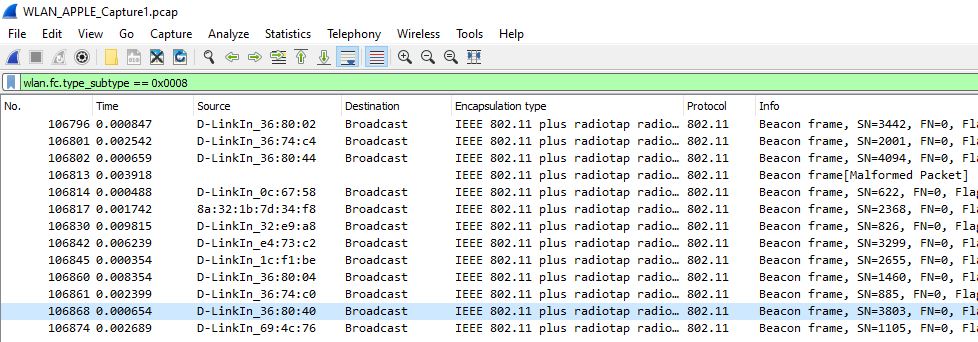
The column of "Time" is extremely helpful, when we filter certain packets for data analysis. For example, we would like to only watch Beacon Frame, thus, in the filter row, we put "wlan.fc.type_subtype == 0x0008" In the menu, we click "View > Time Display Format" and then select "Seconds Since Previous Displayed Packets"


You should be able to see, less than 0.01 seconds, a beacon frame is flipping around in the air. But, be aware, they are not coming from the same STA, as the source MAC is different.

That should pretty much conclude our discussion on "Frame Section."

Thursday, October 10, 2019

WLAN Analysis with Wireshark (Frame Section, Part 2)

This following short article illustrates examples on frame encapsulation type. It starts with a case in wireless, then, covers with other technologies.

Within a Wireshark capture, "Encapsulation type" is one of the sub-fields under the session of Frame. The Wireshark display filter of "Encapsulation type" is frame.encap_type. The link-layer type number is the notation of those items, where default is 1 (Ethernet).

In our Wireless packets collection, the "Encapsulation type" is IEEE 802.11, as displayed below.


Another wireless capture is displayed here, where the link-layer type number is 126.


However, when we turn our attention to LAN in our wired device, it should indicate "Ethernet."


By aligning an example from Wireshark sample packets, the following instance shows some SITA WAN (Societe Internationale de Telecommunications Aeronautiques sample packets (contains X.25, International Passenger Airline Reservation System, Unisys Transmittal System and Frame Relay packets). (https://wiki.wireshark.org/SampleCaptures)


Another example deals with ATM Classical IP packets, where the the link-layer type number is 11.


Tuesday, October 8, 2019

WLAN Analysis with Wireshark (Preface)

As Wireless LAN (WLAN) is getting its popularity, more and more IT engineers are shifting their learning focus from wired network to wireless features.

A regular AP (Access Point) and several STAs are the basic components of WLAN network. In IEEE 802.11 (Wi-Fi) terminology, a station (abbreviated as STA) is a computing device that has the capability to use the 802.11 protocol. In this situation, the IT engineer just needs to connect to that AP, either with console port or web browser into GUI interference, in conducting configuration and troubleshooting.

However, through the deployment of high density APs in a domain, the stated above action appears to be lousy and easily make mistakes. As such, many network device manufacturers would also sell wireless AP controller to handle profile-based configurations and troubleshooting. For example, in D-Link, there are DAP series APs and come up with D-Link Nuclias Connect (DNC) software application to manage those APs.

The WLAN controller format can be very diverse, some of the them are hardware basis, software basis, where cloud-based is another common accepted platform in the latest deployment.

For most of the junior engineers who would like to get involved with Networking technology learning process, they may become frustrated as of the difficulty to do Hands-on practice. Devices in a production environment tend to stay over as they are.

Most of the articles published in the Internet are dealing with (a) description on wireless theories, or (b) vendor-specific command and configurations. We rarely see any specific information or a series of articles to illustrate this concept from user (STA) point of view. This is one of the focus in this blog where the writer would like to focus on. Bring your STA, get some Wireshark connections, let’s go from there.